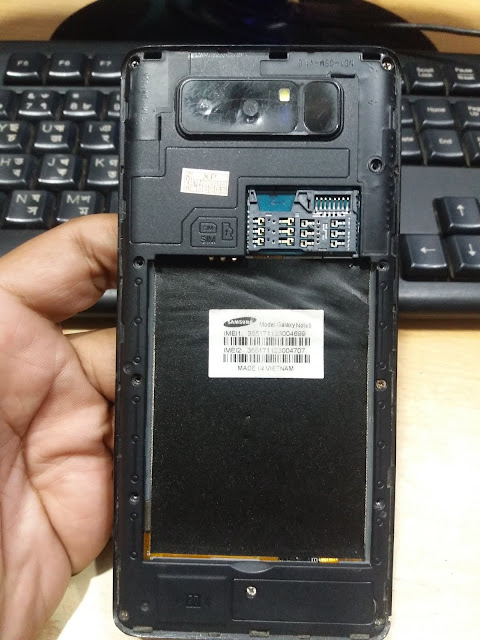
On this page, you will find the official link to download Samsung Clone SM-G930F Stock Firmware ROM (flash file) on your Computer. The firmware comes in a zip package, which contains Flash File, Flash Tool, Driver and How-to Manual.
Firmware version: Samsung Clone SM-G930F_MT6580__6.0.1.
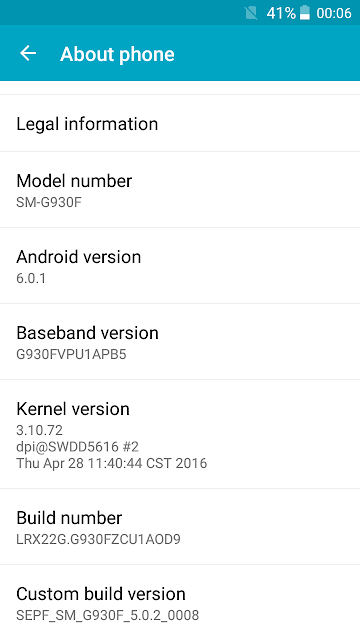
Model Brand : Samsung SM-G930FRom Version : Android 6.0.1Room Type?: Customer Care File
The problem with this file will be solved on your mobile
✓ Samsung Clone SM-G930F Problems missing file.
✓ Samsung Clone SM-G930F Hang Logo Fix
✓ Samsung Clone SM-G930F Quickly Flexible LCD.
✓ Samsung Clone SM-G930F Ram’s slow performance.
✓ Finally your Samsung Clone SM-G930F hang logo solve.
✓ Samsung SM-G930F Also Unwanted monkey / sexy virus.
✓ Samsung SM-G930F Finally unfortunately App has been stopped.
✓ When the Samsung SM-G930F shows Black and White LCD.
✓As can be seen Automatically restart Samsung SM-G930F phone.
✓Automatically install the application on Samsung SM-G930F phone.
✓ Samsung Clone SM-G930F While unfortunately app has been stopped android.
✓ Samsung Clone SM-G930F Frp Bypass Reset File.
✓ Samsung Clone SM-G930F Fastboot Mode Fix fix.
✓ Samsung Clone SM-G930F Dead Recovery Firmware,
Read version:
Samsung Clone SM-G930F Flash File Hang Logo & dead boot Fix
Samsung SM-G930F_MT6580__6.0.1__ALPS.L1.MP6.V2_HEXING6580.WE.L_P31


Firmware details:
Reading Flash Content now ...
Wait for phone...
Phone found! [ 26 ]
Sync...
Inital Boot Ok!
BB_CPU_PID : 6580
BB_CPU_NME : [MediaTek] MT6580_S00
BB_CPU_EXT : 0xCA00 , 0x8A00 , 0x0000
Processing BROM stage
Settings for BROM configured!
SecCfgVal : 0x00000000
BromVer : 0x00FF
BLVersion : 0x0001
PreLoader : Active [ Boot with PL ]
BootLdrSS : NORMAL with PRELOADER
Processing DA stage
DA Select done, will use MTK_AllInOne_DA_v5.1624.16.07
Sending and initialize DA ...
Running DA ver.4.2 on BBID : 0x94
NAND Flash : NOT INSTALLED
eMMC Flash : FE014E50314A39354B12059E003B3275
Initialize Memory ...
DRAM already initialized by Preloader
DAgent sent , init HW now
eMMC FlashIC initialized
[eMMC] : FLASH_VEN : 0xFE , OEM : 014E
[eMMC] : FLASH_INF : [MICRON] , K59J1
[eMMC] : FLASH_CID : FE014E50314A39354B12059E003B3275
[eMMC] : FLASH_BRT : 0x00200000 , 0x00200000 , 0x00200000
[eMMC] : FLASH_LEN : 0x00000001D3000000
[eMMC] : FLASH_UCP : 7472 MiB [eMMC 8 GiB]
DEV RID : 0x0E31449C31ED10420021BDEE713551DA
INT RAM : 0x00020000
EXT RAM : 0x40000000 [1 GiB]
BOOT TYPE : EMMC_FLASH_BOOT
SOC VERIFY : C1
Boot Ok!
ScatCFG : BaseBand : MT6580 , Project : Pack1 , Storage : EMMC
Setting : Flash Pre-Erase (Safe) : Enabled
Setting : AFF verify : Enabled
Setting : HW verify : Enabled
BL : Check HW compatibility
BL : BBID supported by BootLoader!
BL : Check eMMC compatibility
BL : eMMC supported by BootLoader!
BL : BatteryLevel : 3938 mV
BL : BatteryLevel Ok
BL : Flash Pre-Erase
Total blocks to Erase : 1
Erase : 0x0000000001C80000-0x00000001CF300000
Flash Pre-Erase Done, time used : 00:00:05
SecCfg Passed , 1799
BMT remark not need. Will skip
Sending Preloader ...
Use : preloader.bin
Preloader Sent , Init passed
SecCfg Passed , 1799
PartCount : 0014
Update PMT by user request
Repartition Done!
Use FLN Mode
Processing : Flash Write
Flash now : LK
Image Flash Ok
Flash now : BOOT
Image Flash Ok
Flash now : RECOVERY
Image Flash Ok
Flash now : LOGO
Image Flash Ok
Flash now : SECRO
Image Flash Ok
Flash now : SYSTEM
Image Flash Ok
Flash now : CACHE
Image Flash Ok
Flash now : USERDATA
Image Flash Ok
Flash Write Done, time used : 00:04:14
Processing : Verify
Verify Passed : LK
Verify Passed : BOOT
Verify Passed : RECOVERY
Verify Passed : LOGO
Verify Passed : SECRO
Verify Passed : SYSTEM
Verify Passed : CACHE
Verify Passed : USERDATA
Data Verify Done, time used : 00:00:03
Update Mirror PMT
Update Done!
Update RomInfo done
Done!